
What Does a Sri Lanka e-Visa Look Like?
Sri Lanka e-visa is the fastest way for most travelers if you are traveling to this country. Although a visa is really complicated, the e-visa is easily approved with simple documents like a passport and a photo. This e-visa is connected to your passport digitally instead of stamping a visa on your passport.
Format and Appearance
Once approved by the government, the Sri Lanka e-Visa is sent to the applicant via email as a PDF document. You should print it out to get checked at the airport.
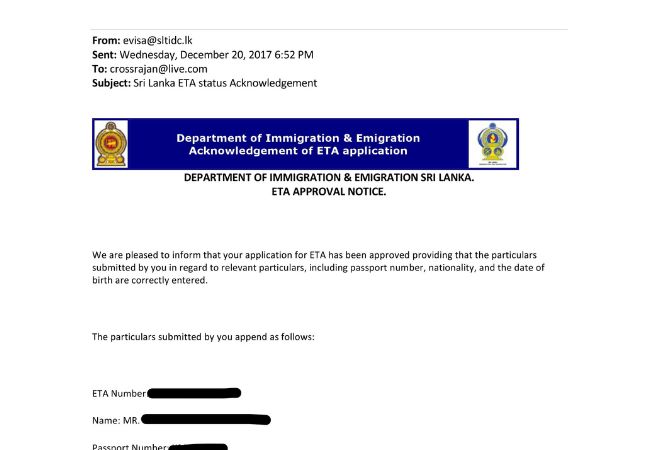
Travelers should print out the ETA before traveling
On the Sri Lanka e-visa, there will be information will be shown:
- ETA Number
- Traveler’s Full Name – As per the passport details.
- Passport Number
- Visa Type – Indicating whether it is for tourism, business, or transit.
- Validity Period – Showing the date range within which the traveler can enter Sri Lanka.
How to Use the e-Visa?
Upon arrival, tourists must present a printed or digital copy of the approved e-Visa/ETA to Sri Lankan immigration authorities at the border. The details will be verified, and an entry stamp will be issued upon successful clearance.
Sri Lanka ETA is an easy alternative to traditional visas and streamlines the process of entry for tourists. To enable hassle-free travel, applicants need to ensure double times that their details are always accurate and in sync with their passport information before travel.
Related Articles
- What is Ashok Vatika in Sri Lanka?
- Which Items Can Tourists Bring to Sri Lanka?
- What Vaccinations Do I Need for Sri Lanka
- Do Indians Need a Visa for Sri Lanka?
- What is Pahiyangala Temple, and Why is It Famous?
- Traveling to Colombo: Is Sri Lanka’s Capital Safe?
- Can You Use a Mobile Copy of Your Sri Lanka Visa at the Airport?
- Backpacking Sri Lanka: Is 7, 10, or 14 Days Enough?
- What Makes Gampaha Special? Top Reasons to Visit
- BYOB in Colombo: Can You Bring Your Own Drinks?

HOW CAN WE HELP?
 NEED HELP 24/7
 United States
+1 949 346 9868
United States
+1 949 346 9868
 United Kingdom
+44 0330 822 7696
United Kingdom
+44 0330 822 7696
 Singapore
+65 6485 3630
Singapore
+65 6485 3630
 Viber
+65 8174 8526
Viber
+65 8174 8526

APPLY WITH CONFIDENCE


|
|||


